Practice Management is not just accounting software. It is designed to strengthen the bond between consultants and their clients, not replace it.
Most software is built for end users. Practice Management is built for consultants, with clients accessing the system through the consultant's control.
Consultants can offer a free accounting portal to clients as part of their service
By replacing WhatsApp messages, Excel files, and repeated calls with a structured system, consultants save time every day.
Unlike single-login systems, Practice Management offers dedicated mobile apps for teams and clients—each with the right access and features.
Tally integration is already available using an additional tool per consultant, so firms don't need to change their core accounting workflow.
GST and accounting workflows are built into the system, keeping both consultants and clients always compliance-ready.
Practice Management is built with independent modules so consultants can choose only the features
they need.
Pricing depends on usage, and minimum usage is completely free, allowing firms to
start without any upfront commitment.
| Module | Purpose | Key Functions | Pricing |
|---|---|---|---|
| Client Management | Store and manage complete client information | Maintain client details, statutory information, business data, forms filing records, and a centralized client profile | Free – Unlimited clients View More |
| Work Management | Work and task tracking for office operations | Create work and tasks, assign to staff, track employee time, calculate work cost, and monitor task progress | Free – Single User View More |
| Office Billing | Manage billing and payment tracking | Create invoices directly or from completed work, track client balances, and maintain billing history | Free – Unlimited invoices View More |
| GST Management | Manage GST filing and compliance | GSTR-1 filing for all clients, GST reports download, compliance tracking, and client GST status monitoring | Usage based pricing View More |
| Client Accounting | Provide accounting tools for clients | Create invoices, record purchases, manage inventory, and track daily expenses | As per selected plan View More |
We're bringing the power of Practice Management to mobile apps, designed separately for your internal team and your clients. Each app is purpose-built to deliver the right information to the right user—without complexity.
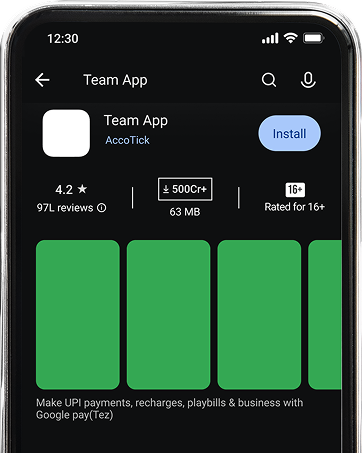
The Team App empowers partners and staff to stay productive outside the office—without compromising control or compliance.
Create and assign tasks in real time with clear responsibility.
View ongoing and pending client work at a glance.
Instant notifications for GST filings, deadlines, and priority tasks.
Secure access to assigned client documents anytime, anywhere.
Managers get instant insights into staff workload and progress.

Practice Management makes it easy for administrators to manage team members with complete control over access, roles, and visibility.
Add new users directly from the admin panel in just a few clicks.
Assign users based on their position (Partner, Manager, Staff, Accountant, etc.) and control what they can view or edit.

Store employee details, benefits, and login credentials securely within the system.
Every team member gets a personalized dashboard showing their assigned tasks, clients, deadlines, and work status.
Activate or deactivate users instantly as your team grows or changes.
User billing is calculated based on active users only, ensuring fair and flexible pricing.
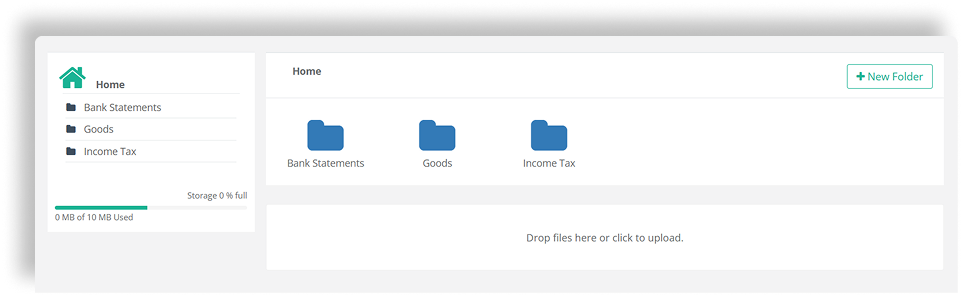
The Shared Data Folder feature creates a common, structured workspace where consultants and clients can upload, access, and manage documents—without emails, WhatsApp, or scattered drives.
Each client gets a dedicated shared folder, with clear access control and activity tracking—ensuring data stays secure and organized.
The Data to Tally Integration allows consultants to export and sync client accounting data directly into Tally, eliminating repetitive manual entry and reducing errors.
This feature is designed for firms that use Practice Management for operations and compliance, while continuing final accounting or audit work in Tally.
This integration is part of our roadmap to connect Practice Management with tools accountants already trust—without forcing them to change their core working style.
Export sales, purchase, expense, and ledger data directly to Tally formats.
Eliminates double entry, saving time and improving data accuracy.
In today's environment, tax and accounting consultants face increasing pressure from
clients,
compliance authorities, and deadlines—while still relying on manual tools.
Simple User-Based Pricing for Consultants








Practice Management is a dedicated platform for tax and accounting consultants to manage office work, client accounting, billing, and GST compliance in one system.
It is designed for Chartered Accountants, tax & GST consultants, accounting firms, and solo practitioners.
Practice Management includes:
Client Management
Work Management
Office Billing
GST Management
Client Accounting
Each module is designed for a specific part of your practice.
Yes. You can choose individual modules or use the complete system based on your requirements.
Yes. Clients can have their own login to manage billing, expenses, upload documents, and track GST status.
Clients manage their daily transactions directly, giving consultants clean, structured data—reducing manual work and speeding up compliance.
You can create work, assign tasks, track progress, monitor time, and calculate work cost—ensuring clear ownership and timely completion.
It helps manage GSTR-1 filing, IMS updates, GSTR-2B reconciliation, reports, and compliance tracking from one dashboard.
Yes. You can create invoices, generate billing from work, and track client balances with no additional cost.
Yes. You can create invoices, generate billing from work, and track client balances with no additional cost.
Yes. Tally integration is available through an additional tool, enabling structured data transfer without manual entry.
YYes. Practice Management is designed to scale from solo consultants to large firms with flexible user-based pricing.
Yes. You can upgrade or downgrade your plan anytime based on your team size and usage.
Pricing is based on usage and number of active users, with minimum usage available for free.
Yes. All core features are available, and pricing depends only on usage or users, not feature restrictions.